View your sent messages and see which employees have read them
TimeForge offers a built-in messaging service to provide a quick and convenient way for employees and managers to communicate. Additionally, TimeForge Messaging offers a written record of any correspondence. To see if your message has been read, and by whom, follow the steps below.
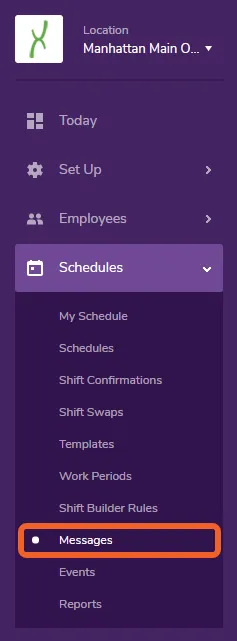
Open the Schedules tab and select Messages
Section titled “Open the Schedules tab and select Messages”The Messages page is under the Schedules tab.
Click the number in the “Viewed Messages” column
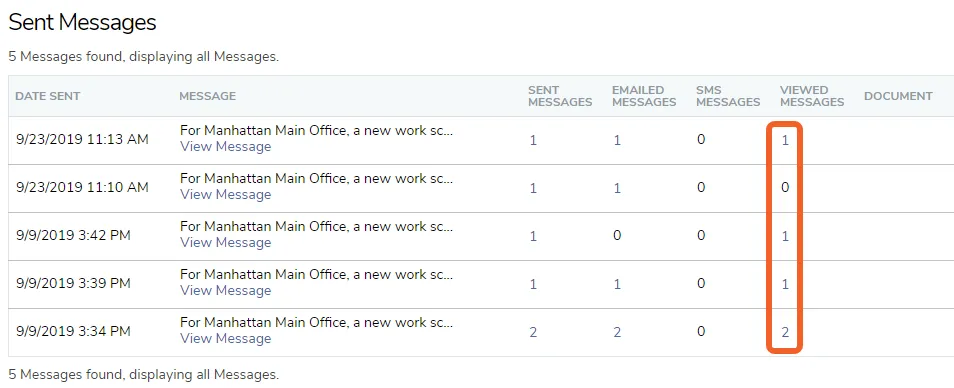
Section titled “Click the number in the “Viewed Messages” column”Scroll down to the section Sent Messages. Find the appropriate message, and click the number in the “Viewed Messages” column for that row.
See who has read the message
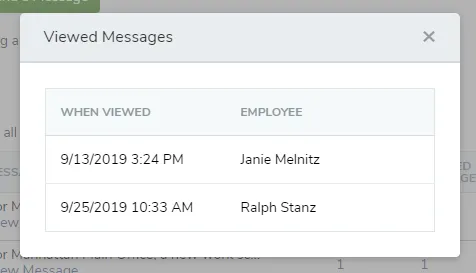
Section titled “See who has read the message”An information box will appear with the names of the employees who have read the message as well as a date and time for when it was viewed.