

View sales percentages and values simultaneously
You can see see sales percentages and values side by side that display the raw projections, forecasts, or actual sales on the schedule.
Login to TimeForge
Section titled “Login to TimeForge”Go to app.TimeForge.com and login to your account.
Go to Sales Categories
Section titled “Go to Sales Categories”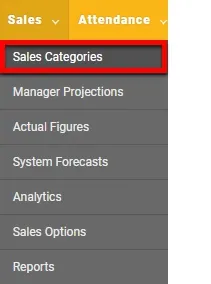
On the Dashboard, find the Sales tab and click on Sales Categories.
Sales Category
Section titled “Sales Category”
Select a Sales Category that you want to see on the schedule and click edit. If you don’t have a Sales Category, you can click Add to create one.
Select Option to View Sales Values
Section titled “Select Option to View Sales Values”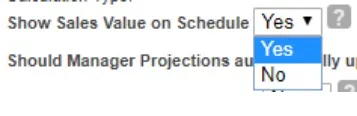
When you are in the setting for a Sales Category, find Show Sales Value on Schedule and select Yes.
Go to the schedules page
Section titled “Go to the schedules page”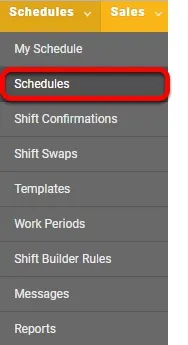
Now find a schedule of your choice. To get to schedules, find the Schedules tab and click on Schedules. Make sure you are in Weekly View.
View It
Section titled “View It”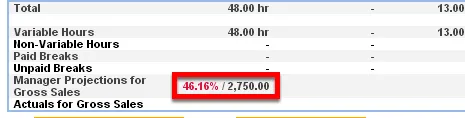
When you see the schedule. This is what the Sales % and Values will look like side by side.