Forecast your sales
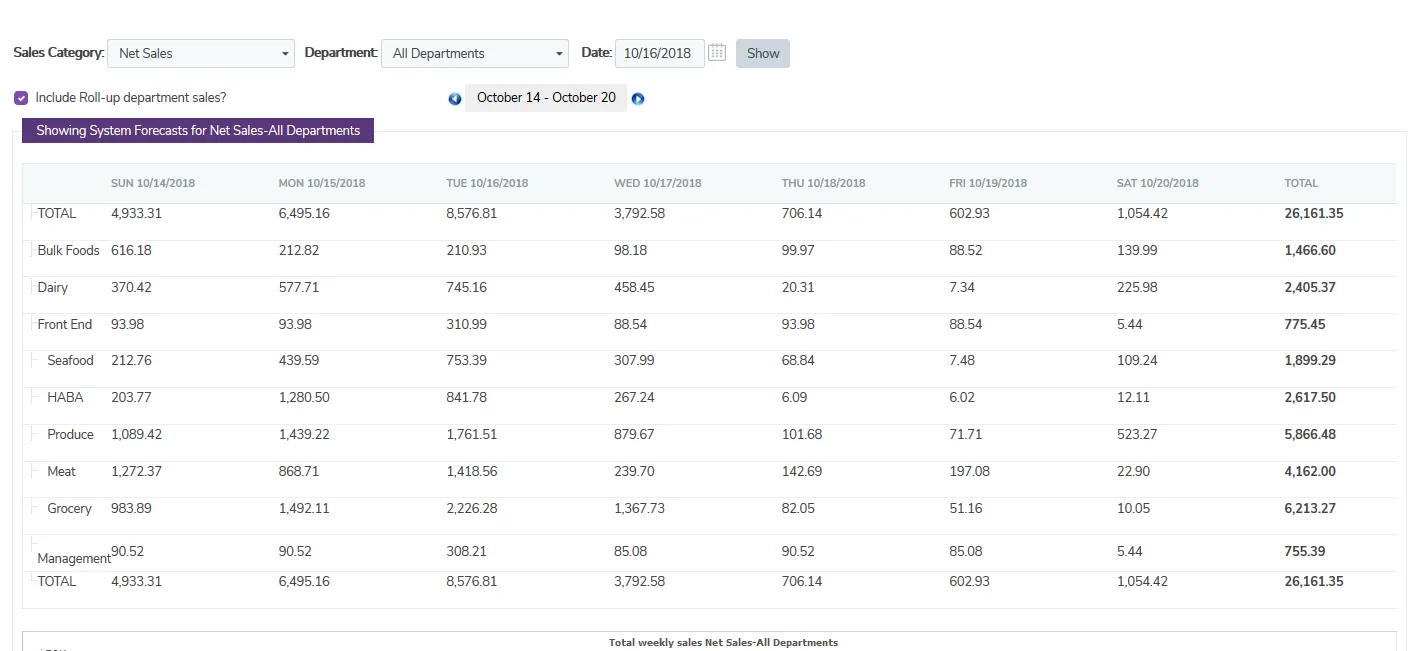
The TimeForge Sales feature is a powerful and easy-to-use analytics tool that can help you keep track of manager projections, actual sales numbers, and forecast sales using system generated projections that are based on your sales history. Sales numbers can be referenced and viewed on employee schedules, and analyzed using the Sales Analytics tool - a simple solution to ensure that complex schedule forecasts are kept in check.
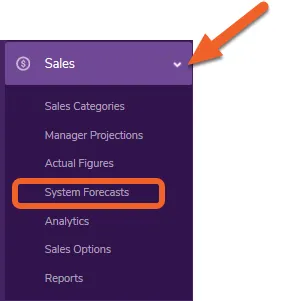
Go to the System Forecasts page under the Sales tab
Section titled “Go to the System Forecasts page under the Sales tab”Open the Sales tab and select System Forecasts from the menu.
Select your sales category and date you want to forecast
Section titled “Select your sales category and date you want to forecast”You can choose any sales category and any date to forecast sales. A Sales Category can include:
- Gross Sales
- Net Sales
- Customer counts, plates, or covers
- Inventory Items, such as khaki pants sold, steaks to prepare, lobster sales, or booked hotel rooms
- Any other number that makes sense for your business!
Click Show to forecast your sales.

Forecast sales
Section titled “Forecast sales”TimeForge will forecast sales for you based on your previous business. You can see daily totals, daily totals broken down by hour or 15 minute increments, or a weekly forecast.