Corporate vs. Location Level
TimeForge is a very sophisticated labor management system that works well for both independently owned and operated businesses, as well as chain concepts and franchises with multiple locations. More than just an employee scheduling system, TimeForge has two separate operating levels that can be customized to match your business hierarchy:
- The Corporate (or Corporation) level is used to manage settings that affect multiple locations, such as separate retail stores, hotels, or restaurants.
- The Location level is used to manage employee schedules and attendance at a specific location.
When operated by a business with more than one location, some of the functionality of TimeForge is moved to the Corporate level to ensure consistent labor reports and pay rules across all business locations.
Corporate level
Section titled “Corporate level”The Corporate level is used to manage settings that affect multiple business locations, such as company-wide Positions, Departments, and Leave Types.
How do I know if I’m at the Corporate Level?
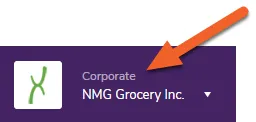
Section titled “How do I know if I’m at the Corporate Level?”When you have multiple locations (2 or more) in TimeForge and you’re at the Corporate level, you will see the word “Corporate” followed by the name of your business:
How do I get to the Corporate Level?
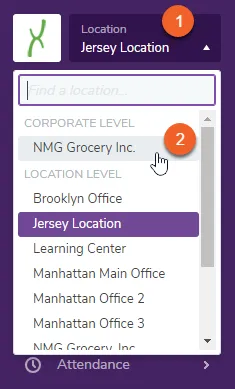
Section titled “How do I get to the Corporate Level?”Simply click the top of the navigation pane to open up the menu, then select the name of your business under CORPORATE LEVEL.
Location level
Section titled “Location level”The Location level is used to manage labor at a specific location, including employee schedules and attendance.
How do I know if I’m at the Location level?
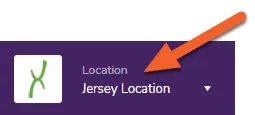
Section titled “How do I know if I’m at the Location level?”When you’re at the Location level and operating with multiple locations inside of TimeForge, you will see the word “Location” followed by the name of your currently-selected location.
How do I get to the Location Level?
Section titled “How do I get to the Location Level?”Simply click the top of the navigation pane to open up the menu, then select the name of a location under LOCATION LEVEL.
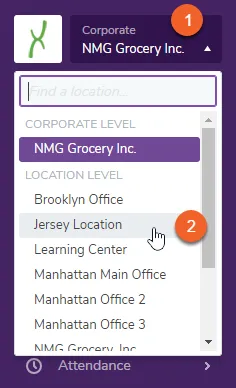
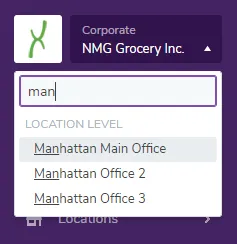
A real-time search box also allows you to quickly search through tens, hundreds, or thousands of store locations by name, store number, address, or zip code: